3D Dragon and Castle Lantern Laser Cut Files: Bring Fantasy to Life with Light and Wood
Imagine a warm, flickering glow emanating from a intricately layered wooden lantern, where a dragon soars above ancient castle towers or perches in silent vigil against a rising sun. This isn’t a scene from a fantasy novel—it’s a tangible creation you can build yourself. The 3D Dragon and Castle Lantern Laser Cut digital download offers everything you need to craft three stunning, illuminated fantasy dioramas using a laser cutter. In this guide, we’ll explore what these files are, how they work, why they’re so popular among makers and fantasy enthusiasts, and how you can use them to add a touch of magic to your home, workspace, or gaming setup.
What Are 3D Dragon and Castle Lantern Laser Cut Files?
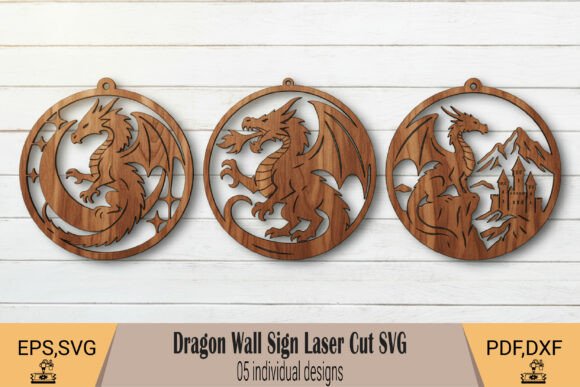
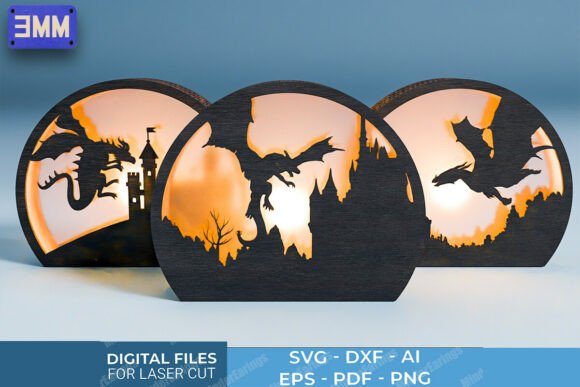
At their core, these are digital design files—blueprints, essentially—created specifically for laser cutting machines. The set includes three unique lantern designs, each depicting a classic fantasy vignette: a dragon flying over a castle, a dragon perched on a tower, and a dragon silhouetted against a rising sun. When cut from 3mm thick material (such as plywood, MDF, or acrylic) and assembled with the included layers, they form a three-dimensional lantern. Place an LED tea light or small lamp inside, and the scene comes alive with dramatic shadows and a soft, ambient glow.
These files are optimized for laser cutters, meaning they have clear cut lines (where the laser cuts all the way through) and engrave lines (where the laser only marks the surface). This distinction is crucial for achieving clean, precise results. The designs are scalable and fully editable, so you can adjust size, details, or even combine elements from multiple lanterns into your own custom creation.
Why Laser Cut Lanterns? The Appeal of Light and Layering
Laser-cut lanterns have gained tremendous popularity in the maker community for several reasons. First, they combine craftsmanship with technology—you get the precision of a laser cutter with the warmth of a handmade object. Second, the layered construction creates a stunning 3D effect that simple flat prints cannot match. The interplay of light and shadow across multiple depth planes gives the dragon and castle a sense of depth and movement, as if the scene is alive inside the lantern.
For fantasy lovers, these lanterns are more than just decor. They evoke the atmosphere of medieval castles, epic quests, and mythical creatures. Placing one on a bookshelf, desk, or gaming table instantly transforms the space into something more immersive. They also make outstanding gifts—unique, personal, and handmade by you.
The Three Lantern Designs at a Glance
- Dragon Flying Over Castle: A sweeping aerial perspective with the dragon gliding above battlements and towers. The layered clouds and castle walls give a sense of scale and motion.
- Dragon Perched on a Tower: A close-up, dramatic composition. The dragon rests atop a spire, wings folded, as if guarding the fortress. Ideal for creating a moody, sentinel-like presence.
- Dragon Silhouetted Against a Rising Sun: A majestic sunrise scene with the dragon’s silhouette framed by radiant beams. This design emphasizes contrast and atmospheric lighting.
Each design includes separate layers for the background, foreground, and details, all of which interlock or stack for easy assembly. The files are marked with “3MM” to indicate the recommended material thickness, ensuring a perfect fit.
Understanding the Included File Formats
One of the most important aspects of any laser cut design is the file format. This download includes six different formats, each serving a specific purpose. Here’s a quick breakdown to help beginners understand what they’re working with:
| Format | Best For |
|---|---|
| SVG (Scalable Vector Graphics) | Laser cutting software (LightBurn, Glowforge, etc.). Clean, scalable, and widely supported. |
| DXF | CAD software and many laser cutter workflows. Ideal for advanced users who want to edit precise geometry. |
| AI (Adobe Illustrator) | Full editability. Change colors, resize entire layers, or tweak engrave patterns with ease. |
| EPS | A versatile vector format compatible with many design programs, including CorelDRAW and Inkscape. |
| Universal viewing and printing. Use to check the design before cutting, or share with someone who doesn’t have vector software. | |
| PNG | High-resolution image with transparent background. Useful for previews, mockups, or even printing if you want to assemble by hand. |
Having multiple formats ensures that regardless of your software or laser cutter model—CO2, diode, or even a CNC router—you can adapt the files to your workflow. This flexibility is especially valuable for beginners who are still learning which tools work best for them.
How to Use the Files: A Step-by-Step Overview
If you’re new to laser cutting, the process might seem technical, but it’s quite straightforward. Here’s a general outline of how these files are used:
- Download and unzip the file package. You’ll find folders for each lantern design, each containing all six formats.
- Import the SVG or DXF into your laser cutting software. Most programs (like LightBurn or LaserGRBL) support these formats natively.
- Set your material to 3mm thick (plywood, MDF, acrylic, or even cardboard for prototyping). Adjust power and speed settings based on your material and laser wattage.
- Cut and engrave each layer. The files are separated into distinct layers or colors—typically one color for cut lines, another for engrave lines.
- Assemble the layers. The pieces are designed to fit together with tabs, slots, or simple stacking. Most designs do not require glue, though a small amount of wood glue can add stability.
- Insert a light source—an LED tea light, fairy lights, or a small puck light works perfectly. Never use a real flame inside a wooden lantern.
The entire process, from import to finished lantern, can take anywhere from one to three hours, depending on your experience and the complexity of the design. The results are well worth the time investment.
Tips for Beginners
- Test on scrap material first. Cut a small test piece to confirm your settings are correct before cutting the full design.
- Use consistent material thickness. Even a slight variation (e.g., 2.8mm vs 3.2mm) can affect how layers fit together. Measure your material with calipers if possible.
- Consider painting or staining. Unfinished plywood looks great, but you can also stain it to look like aged wood, or paint the layers different colors for a stained-glass effect.
- Experiment with backlighting. Try different LED colors—warm white for a cozy feel, amber for a medieval torch effect, or cool blue for a magical atmosphere.
Practical Relevance: Where to Use These Lanterns
These lanterns are not just a fun project—they have real practical and aesthetic applications in modern life. Here are a few ideas:
Home Decor
Place a lantern on a mantelpiece, entryway table, or nightstand. The ambient light creates a cozy, storytelling atmosphere that plain lamps cannot replicate. Rotate the three designs seasonally or display them together as a set.
Gaming and Hobby Spaces
For tabletop RPG players (Dungeons & Dragons, Pathfinder, etc.), these lanterns are perfect for setting the mood. Use them as centerpieces during game night, or as props to enhance the narrative. The dragon silhouette design, in particular, screams "epic campaign finale."
Gifts for Fantasy Enthusiasts
If you know someone who loves fantasy books, movies, or games, a handmade 3D lantern is a gift that shows thought and effort. Pair it with a set of LED candles for a complete package. The file formats also allow you to customize the design—add a name, a quote, or modify the dragon’s pose—making it truly one-of-a-kind.
Creative Workshops and Education
Teachers and workshop leaders can use these files to introduce students to laser cutting, design thinking, and assembly logic. The layered construction teaches spatial reasoning, and the fantasy theme keeps learners engaged. It’s also a great project for maker spaces and libraries.
Common Misunderstandings Clarified
As with any digital product, there are a few points that sometimes confuse new buyers. Let’s clear them up:
- “Do I need a laser cutter to use these files?” Yes. These are laser cut files designed for machines that cut and engrave. However, you could also use them with a CNC router with a fine bit, or even print the PDF patterns and cut them by hand with a scroll saw (though that requires significant skill).
- “Are the designs ready to cut as-is?” Generally yes. The files include cut and engrave lines separated by color or layer. You may need to adjust power/speed settings for your specific machine, but no geometry editing is required.
- “Can I resize the designs?” Absolutely. Because they are vector files (SVG, AI, DXF, EPS), you can scale them up or down without losing quality. Just ensure that if you change the size, the material thickness remains appropriate—larger lanterns may need thicker material for stability.
- “Is assembly difficult?” Not at all. The designs are engineered to be beginner-friendly. Layers are numbered or labeled, and tabs guide alignment. Most people can assemble a lantern in under 30 minutes once the pieces are cut.
Why This Product Embodies Modern Creativity
Digital crafting files like this one represent a beautiful convergence of technology, art, and personal expression. Instead of buying mass-produced decor, you become a creator. You choose the material, the finish, the light source, and even the scale. Every lantern you make is slightly different—yours alone. This aligns with the growing maker movement, where people seek hands-on, meaningful interactions with the objects around them.
Furthermore, the fantasy theme taps into a deep cultural well. Dragons and castles appear in stories across the world, from ancient myths to modern epics. By bringing these symbols into your physical space, you connect with a timeless tradition of storytelling and imagination. The lantern becomes a beacon of that creativity, glowing softly in your room.
Conclusion: Illuminate Your World with Dragons and Castles
The 3D Dragon and Castle Lantern Laser Cut digital download is more than just a set of files—it’s an invitation to create. Whether you’re a seasoned laser cutter operator or a curious beginner, these designs offer a rewarding project that blends technical skill with artistic vision. With three unique scenes, multiple file formats, and clear instructions built into the design, you have everything you need to produce a captivating piece of illuminated art.
So why wait? Download the files, fire up your laser cutter, and watch as a dragon and castle emerge from wood and light. Your own fantasy realm is just a few layers away.